

Kue
Your workspace's own AI agent, the page you land on, and the way to get things done across KNetAI.
Every workspace has its own agent, Kue. It is created for you the first time you open the workspace, and it only works inside that workspace.
you state a goal → Kue plans it → Kue uses the platform's services → you check the result in a tab
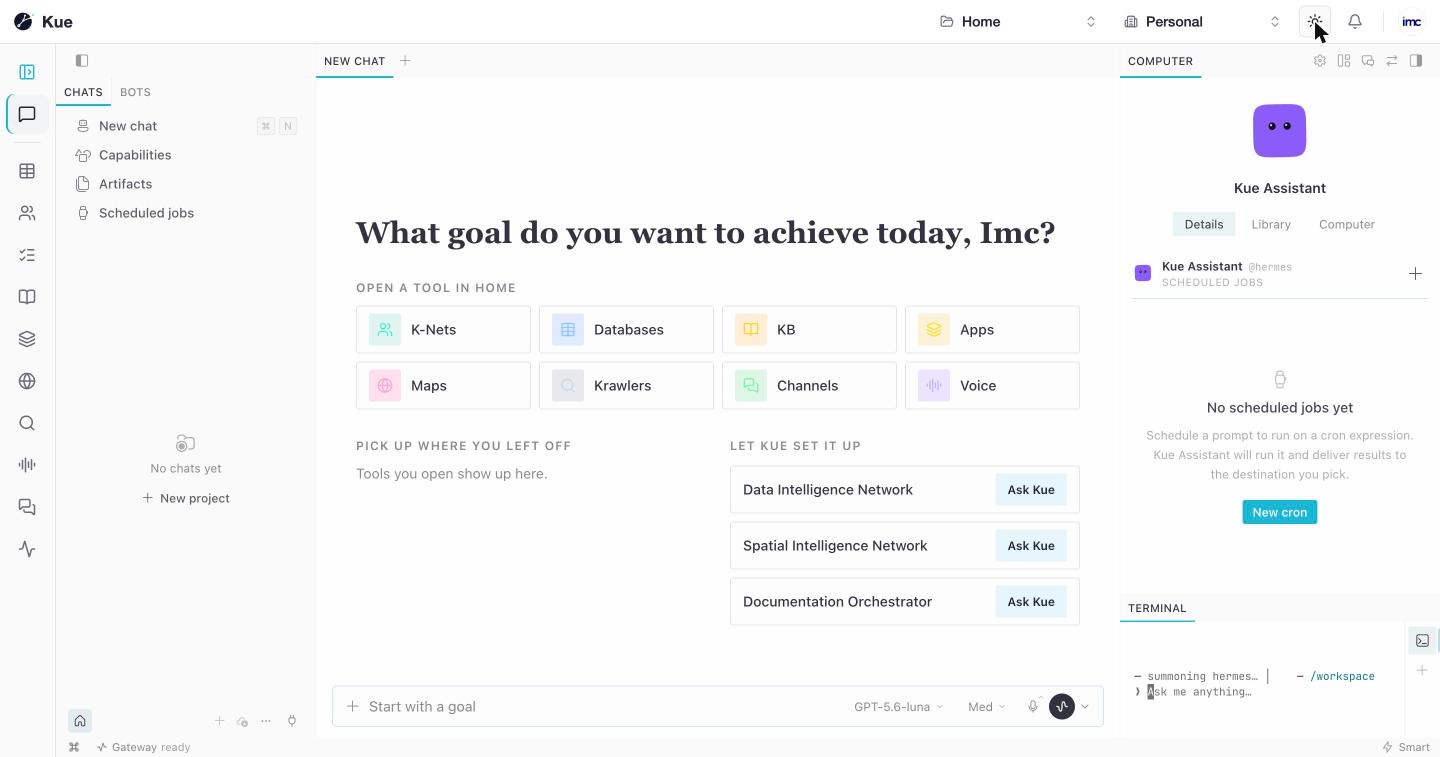
The Kue screen
Centre: the chat. An empty chat greets you with What goal do you want to achieve today? and three shortcuts:
- Open a tool in Home: the eight main services as tiles.
- Pick up where you left off: the tools and items you opened recently.
- Let Kue set it up: ready-made K-Net goals (Data Intelligence Network, Spatial Intelligence Network, Documentation Orchestrator). Ask Kue starts one.
At the bottom is the composer, Start with a goal, with the model picker, the reasoning level and voice input.
Left: chats. New chat, your chat history, Capabilities (what Kue can do), Artifacts (files Kue produced) and Scheduled jobs. The Bots tab lists the workspace's agents.
Right: the assistant. Details about Kue, its Library, and the Computer view, where you can watch Kue use a browser. Scheduled jobs run a prompt on a schedule (a cron expression) and deliver the result where you choose; create one with New cron. The Terminal below shows the agent's own console.
The status bar at the bottom shows whether Kue is connected (Gateway ready).
Working with services
Open any service from the rail; it opens as a tab and the chat moves to a panel on the right. You can keep talking to Kue while you look at the result. See the Platform Tour.
Kue uses the platform through the Connectors service, with the same rights you have in the workspace. For example, it can create a database or a knowledge base, read and write your tables, and call the apps you connected. When a step needs you, such as linking an account, Kue gives you a button that opens the right screen.
When Kue is asleep
An idle Kue sleeps to save resources, and wakes when you come back. While it wakes, the screen stays usable and shows Waking Kue…; your chats are already listed.
Coming soon
These are designed and not yet live:
- A welcome card with four starters: Connect an app, Add a channel, Create a database, Create a knowledge base.
- Round trips: after you link an app or add a channel, you return to Kue and it carries on.
- An approval prompt before Kue sends, posts, updates or deletes anything on your behalf.