Docs
Channels


Channels
One shared inbox for your workspace's customer conversations — email, website chat, WhatsApp, Telegram and API — answered by people and agents.
Channels (KNet Channels, at channels.knetai.com) is the inbox where conversations from every channel meet. People and agent bots answer them side by side. Each KNet workspace is one Channels account; the workspace owner is its administrator and everyone else is an agent.
Ready on the first visit
Every workspace starts with:
- an email address,
hello.<workspace>-<organisation>@agents.knetai.com; - a website live-chat inbox and a KNet flows API inbox;
- labels, canned responses, a
supportteam and business hours; - a help centre at
/hc/<workspace>-<organisation>; - its members added to those inboxes.
The screen
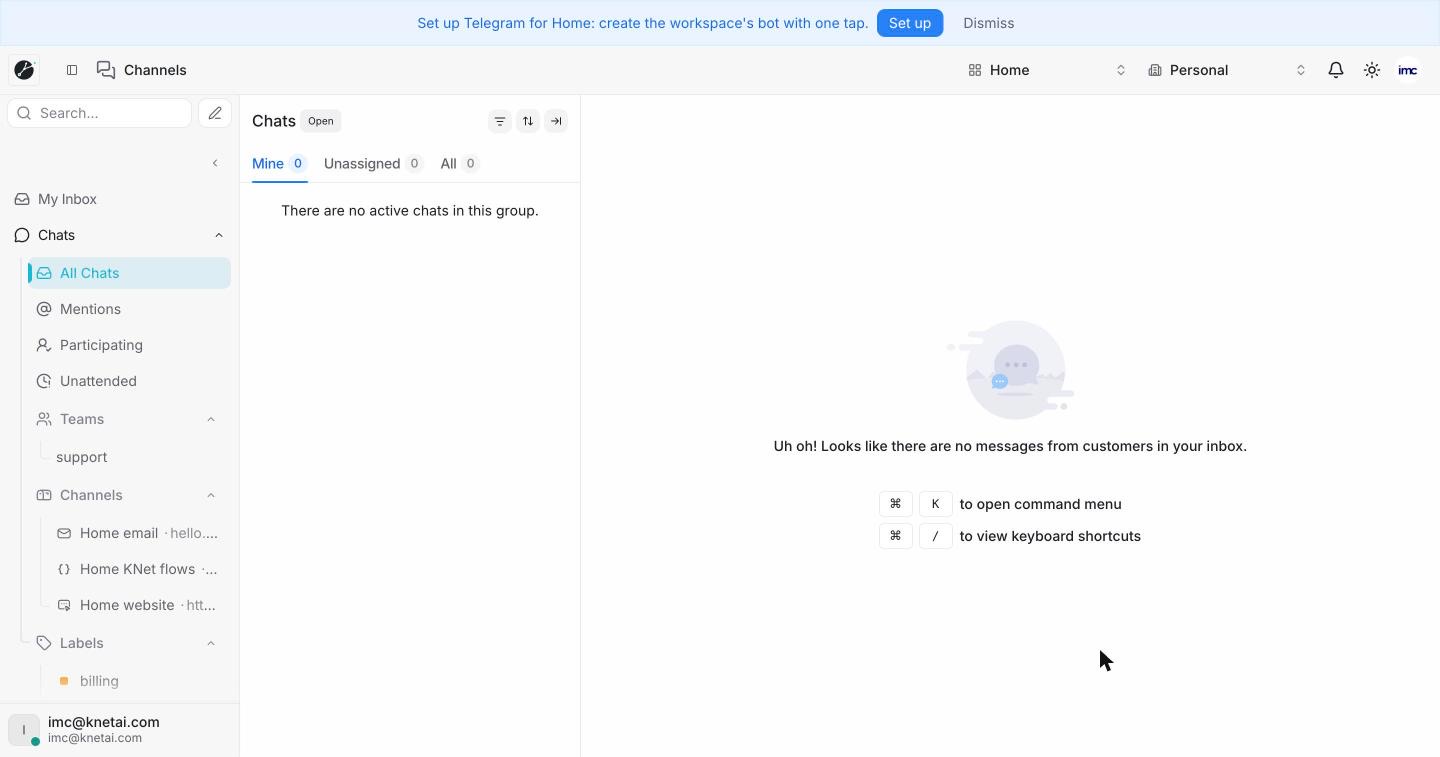
- A banner offers Set up Telegram for the workspace with one tap, until you set it up or dismiss it.
- The top bar is the platform's: workspace menu, organisation menu, notifications, theme and account menu.
- The left sidebar lists My Inbox, Chats (All Chats, Mentions, Participating, Unattended), Teams, Channels (the workspace's inboxes, such as Home email, Home KNet flows and Home website) and Labels.
- The middle column lists conversations under Mine, Unassigned and All; the right side shows the open conversation.
On the narrow icon rail (inside Kue, or with the sidebar folded) the pages are:
| Page | What it is for |
|---|---|
| Inbox | Notifications about your conversations |
| Conversations | All customer conversations across your channels |
| Contacts | People who have talked to you |
| Companies | Organisations your contacts belong to |
| Reports | Volume, response times and team performance |
| Campaigns | Proactive messages to your customers |
| Portals | Help centre articles for your customers |
| Settings | Inboxes, agents, teams and account settings |
Typical tasks
- Add Telegram in one tap through the KNet manager bot @knetaibot.
- Add WhatsApp: see WhatsApp.
- Give an agent its own email address from the Agent email tile.