Docs
Databases


Databases
Spreadsheet-style databases and documents for your workspace, and the home page of every workspace.
Databases (KnetDB) holds your workspace's tables and documents. Each document is a set of linked tables with formulas, views and access rules, like a spreadsheet that behaves like a database. Kue, K-Nets and Connectors read and write the same tables.
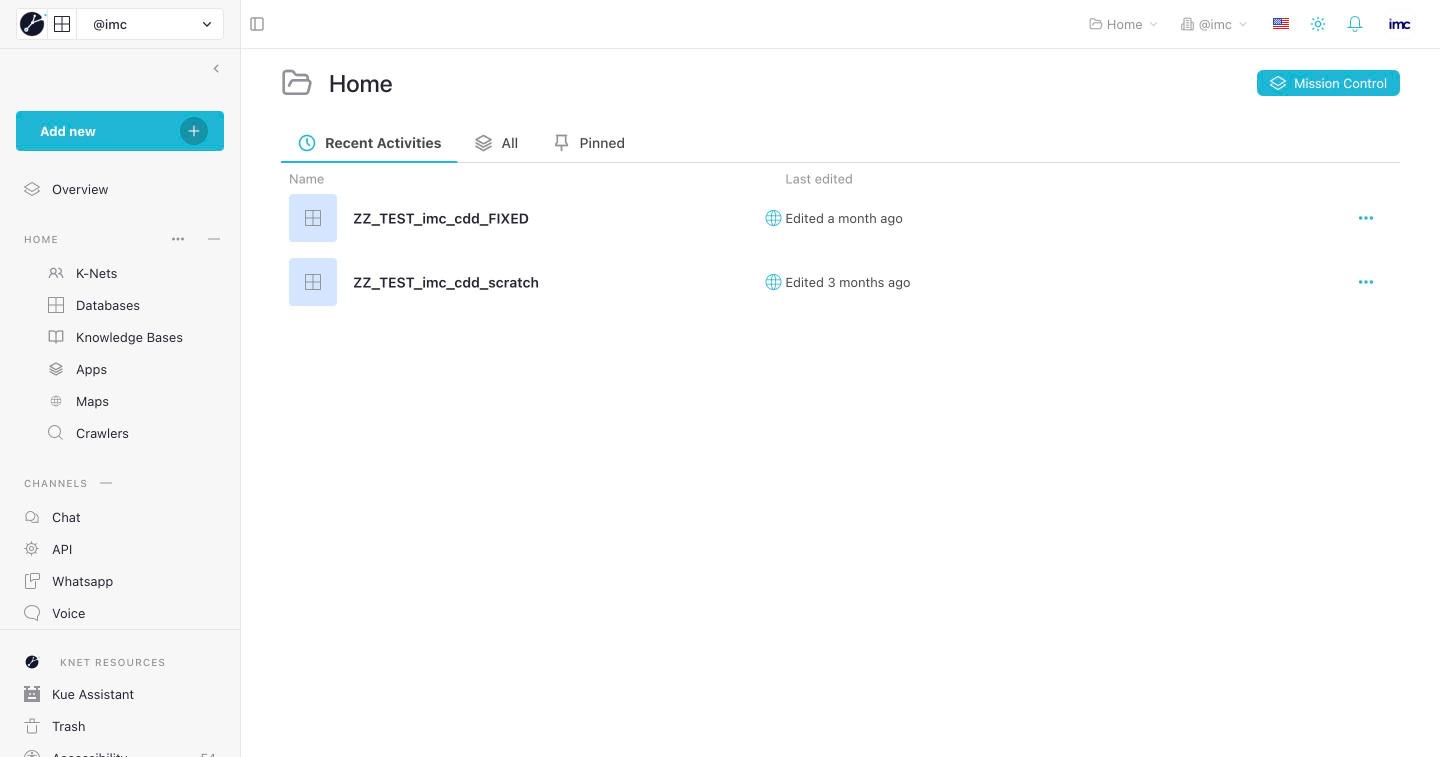
Open it from the rail in Kue, or at flow.knetai.com → your organisation → your workspace.
The page
- Add new creates a document, imports a file (CSV, Excel) or adds a workspace.
- Recent Activities, All and Pinned list the workspace's documents.
- Mission Control opens the workspace's research templates.
The left pane lists everything in the workspace:
| Group | Pages |
|---|---|
| Your workspace | Overview (recent documents and activity), K-Nets, Databases, Knowledge Bases, Connectors, Maps, Crawlers |
| Channels | Chat (chat with agents about your data), API (API keys for this workspace), Whatsapp (connected numbers), Voice (voice agents) |
| KNet resources | Kue, Examples & Templates, Trash (restore deleted documents), Tutorial, Help Center |
Typical tasks
- Ask Kue: "Create a database of my suppliers with name, country and rating."
- Start from Examples & Templates and edit the copy.
- Share a document: open it and use Share to invite people or set access per table.